Aned Book Help
Help home Menu Step-by-step Video guides What's new Contact us Download Price YouTube
Start
  • Dashboard
  • Calendar & Reminders
Masters
  • Customers & Suppliers
  • Ledgers
  • M.R.s
  • Items
  • Barcode Labels
  • HSN / SAC Codes
  • Batch ledger
  • Physical Stock
  • Stock Journals
  • Stock Transfers
  • Stock by Godown
  • Shifts
  • Duplicate Check
  • Opening Balances
Sales
  • Sales Invoices
  • Sale Challans
  • E-way Bills
  • Quotations
  • Sale Orders
  • Credit Notes
Purchase
  • Purchase Bills
  • Purchase Challans
  • Purchase Orders
  • Debit Notes
Vouchers
  • Receipt Vouchers
  • Payment Vouchers
  • Contra Vouchers
  • Journal Vouchers
  • Sale Vouchers
  • Purchase Vouchers
  • GST Outward
  • GST Inward
  • All Vouchers
  • Day Book Entry — cash and bank, many days
  • Bank Statement Entry
  • Credit Note (Amount)
  • Debit Note (Amount)
  • Outstanding Ageing
  • Interest on Overdue
  • Cheques (PDC)
  • Bank Reconciliation
Restaurant
  • Tables
Transport
  • Consignment Notes
  • Freight Register
Reports
  • GST Reports
  • Sale / Purchase Analysis
  • Stock Analysis
  • Reorder Suggestion
  • Commission
  • Pharmacy Reports
Books
  • Accounts
  • Profitability
  • Imports & Exports
Settings
  • Company profile
  • Trade profile
  • Metal rates
  • Fuel rates
  • Cost centres
  • Nozzles
  • Bill of materials
  • Barcode labels
  • Financial year
  • All companies
  • Users
  • HSN / SAC codes
  • GSTIN verification
  • Backup / Export
  • Printer setup
  • Extra counters
  • Registration
  • About
Aned Book help › Menu › Masters

Items

In the software: Masters › Items

Every edition

The item master: rates, MRP, HSN, GST, units, batches/expiry, serials, barcodes, stock.
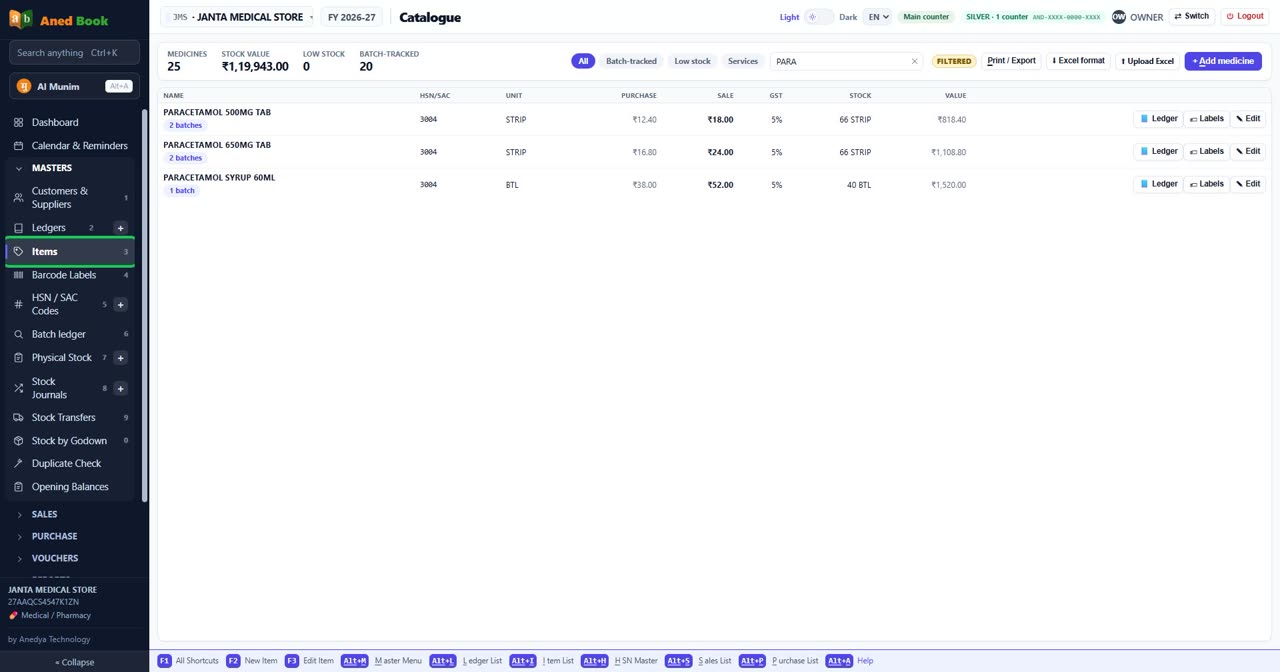
Items in Aned Book, with the menu open at Masters

Ready questions

  • How do I add a new item?
  • How do I change an item’s sale price?
  • How do I see every in and out of one item?
  • How do I sell loose tablets out of a strip?
  • How do I give an item a barcode?
  • How do I see which items are running low?
  • It says “HSN code is required”
  • It says “… is already an item”
  • It says “Minimum sale price cannot be above the sale price”
  • Why does every item need an HSN code?
  • Why can two items have the same name?

Step by step

  • Getting started — download, install, and make your first bill
  • How to find an item, see its stock, and follow every movement of it
  • How to print barcode and shelf labels

Questions about this screen

  • How do I add a new item or product to my stock?
  • How do I edit or delete a party or an item?

Every option on this screen

Tabs

  • All
  • Batch-tracked
  • Low stock
  • Services

Buttons

  • ✕ — Clear the filter (Esc)
  • Print / Export
  • ⬇ Excel format — Excel sheet with every column for your trade, and one filled example row
  • ⬆ Upload Excel — Upload the filled sheet to add medicines in bulk
  • + Add medicine
  • 📘 Ledger — Every movement of this item (Alt+E)
  • 🏷 Labels — Print barcode labels for this item
  • ✎ Edit

Boxes to fill in

  • Name, HSN or category

Columns in the list

  • Name
  • HSN/SAC
  • Unit
  • Purchase
  • Sale
  • GST
  • Stock
  • Value
Still stuck? Press Alt + A inside the software and ask in your own words — it works with no internet. Or talk to us on WhatsApp, phone or e-mail.
Aned Book — GST billing and inventory software for Indian shops. ANEDYA TECHNOLOGY LLP · anedya.net · Contact us