Aned Book help › Menu › Start
Dashboard
In the software: Start › Dashboard
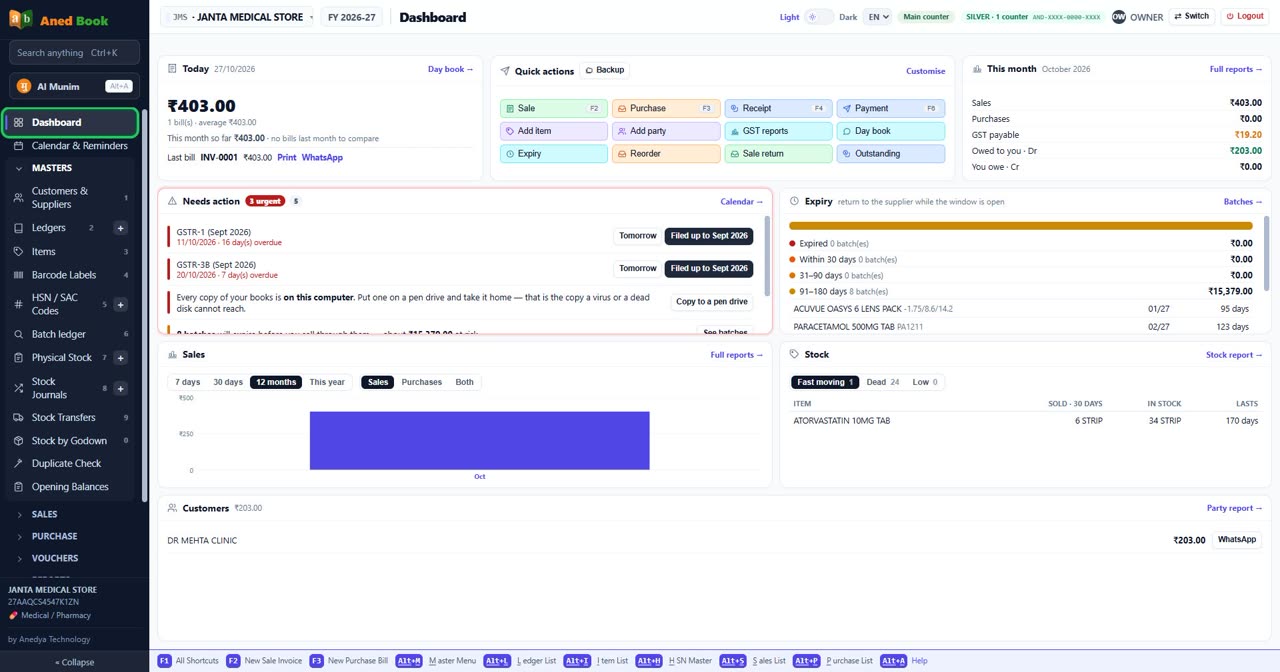
Every editionThe first screen: today's sales, dues, low stock, GST due, reminders and the cards the shop chose (Customise).
Step by step
- Getting started — download, install, and make your first bill
- How to record cash put into the bank, or taken out of it
Every option on this screen
Buttons
- Backup
- Sale F2
- Purchase F3
- Receipt F4
- Payment F6
- Add item
- Add party
- GST reports
- Day book
- Expiry
- Reorder
- Sale return
- Outstanding
- Tomorrow
- Filed up to Sept 2026 — Marks this return and every earlier one as filed
- Copy to a pen drive
- See batches
- Count now
- 7 days
- 30 days
- 12 months
- This year
- Sales
- Purchases
- Both
- Fast moving 1
- Dead 24
- Low 0
Columns in the list
- Item
- Sold · 30 days
- In stock
- Lasts
Still stuck? Press Alt + A inside the software and ask in your own words — it
works with no internet. Or talk to us on WhatsApp, phone or e-mail.