Aned Book help › Menu › Settings
Users
In the software: Settings › Users (Settings, then the tab on the left)
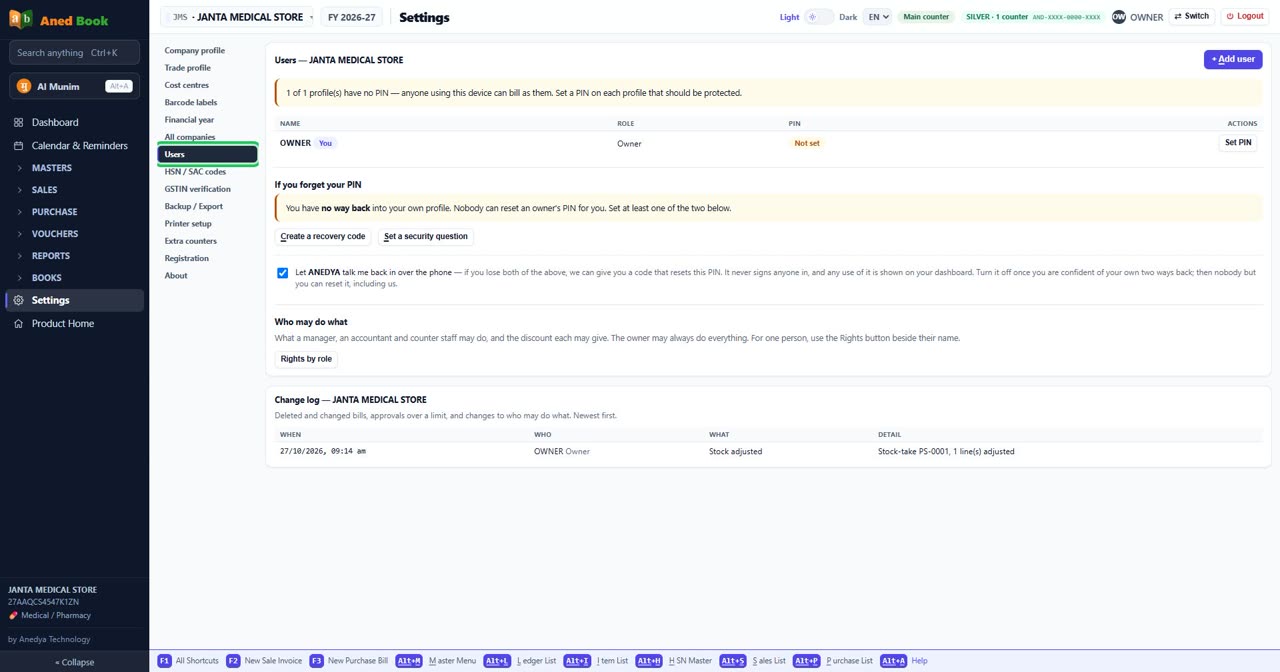
Step by step
Questions about this screen
Every option on this screen
Buttons
- + Add user
- Set PIN
- Create a recovery code
- Set a security question
- Rights by role
Tick boxes and choices
- ANEDYA — talk me back in over the phone — if you lose both of the above, we can give you a code that resets this PIN. It never signs anyone in, and any use of it is shown on your dashboard. Turn it off once you are confident of your own two ways back; then nobody but you can reset it, including us.
Sections on this screen
- Users — JANTA MEDICAL STORE
- If you forget your PIN
- Who may do what
- Change log — JANTA MEDICAL STORE
Columns in the list
- Name
- Role
- PIN
- Actions
- When
- Who
- What
- Detail
Still stuck? Press Alt + A inside the software and ask in your own words — it
works with no internet. Or talk to us on WhatsApp, phone or e-mail.