Aned Book help › Menu › Settings
Backup / Export
In the software: Settings › Backup / Export (Settings, then the tab on the left)
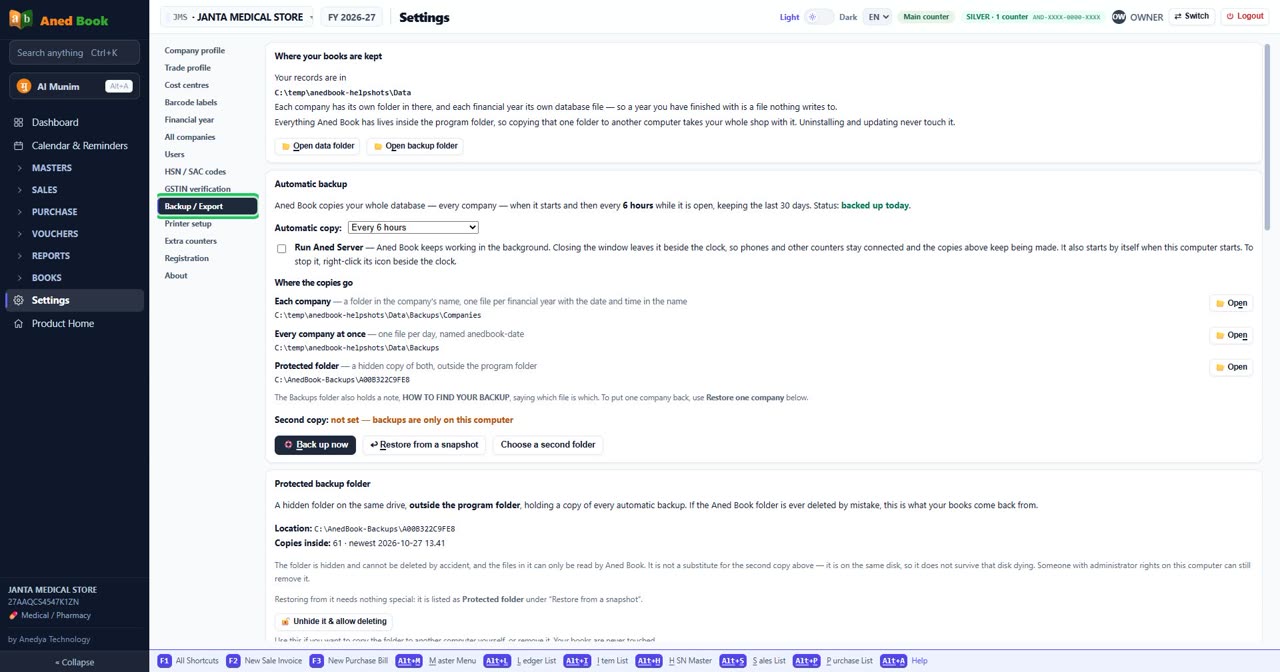
Questions about this screen
- How do I take a backup of my data or restore an old one?
- Can I keep a second copy of my backup on a pen drive?
- Is my data safe if the computer breaks?
Every option on this screen
Buttons
- 📂 Open data folder
- 📂 Open backup folder
- 📂 Open
- 🛟 Back up now
- ↩ Restore from a snapshot
- Choose a second folder
- 🔓 Unhide it & allow deleting
- 🏷️ Back up JANTA MEDICAL STORE
- ↩ Restore one company
- Refresh
- Save
- Send a test message
- Connect Google Drive
- Check now
- ↓ Save the file
- ↑ Choose the file
- ↓ Save FY 2026-27 as readable data
- ⬇ Sales register (CSV)
- ⬇ Purchase register (CSV)
- ⬇ GSTR-1 B2B (CSV)
- ⬇ Batch & expiry (CSV)
- ⬇ Item master (CSV)
Boxes to fill in
- Automatic copy: Only when Aned Book closesEvery hourEvery 2 hoursEvery 3 hoursEvery 4 hoursEvery 6 hoursEvery 8 hoursEvery 12 hours — choose from: Only when Aned Book closes · Every hour · Every 2 hours · Every 3 hours · Every 4 hours · Every 6 hours · Every 8 hours · Every 12 hours
- Mail server
- Port
- Your email
- App password
- Send it to
- How often — choose from: Every day · Every week
- What to send — choose from: Sales and purchases · Sales only · Purchases only
- From
- To
Tick boxes and choices
- Run Aned Server — Aned Book keeps working in the background. Closing the window leaves it beside the clock, so phones and other counters stay connected and the copies above keep being made. It also starts by itself when this computer starts. To stop it, right-click its icon beside the clock.
- Send a copy automatically
Sections on this screen
- Where your books are kept
- Automatic backup
- Where the copies go
- Protected backup folder
- This company on its own
- Take a copy home
- Post a copy to yourself
- Google Drive - a copy in your own Google account
- Check my stock adds up
- Send my sales and purchases to somebody else
- Bring in a file from another computer
- A plain readable copy of this year
- Export for your accountant
Still stuck? Press Alt + A inside the software and ask in your own words — it
works with no internet. Or talk to us on WhatsApp, phone or e-mail.