Aned Book help › Menu › Reports
Sale / Purchase Analysis
In the software: Reports › Sale / Purchase Analysis
Basic, Silver, Gold onlySale and purchase analysis by item, party, period.
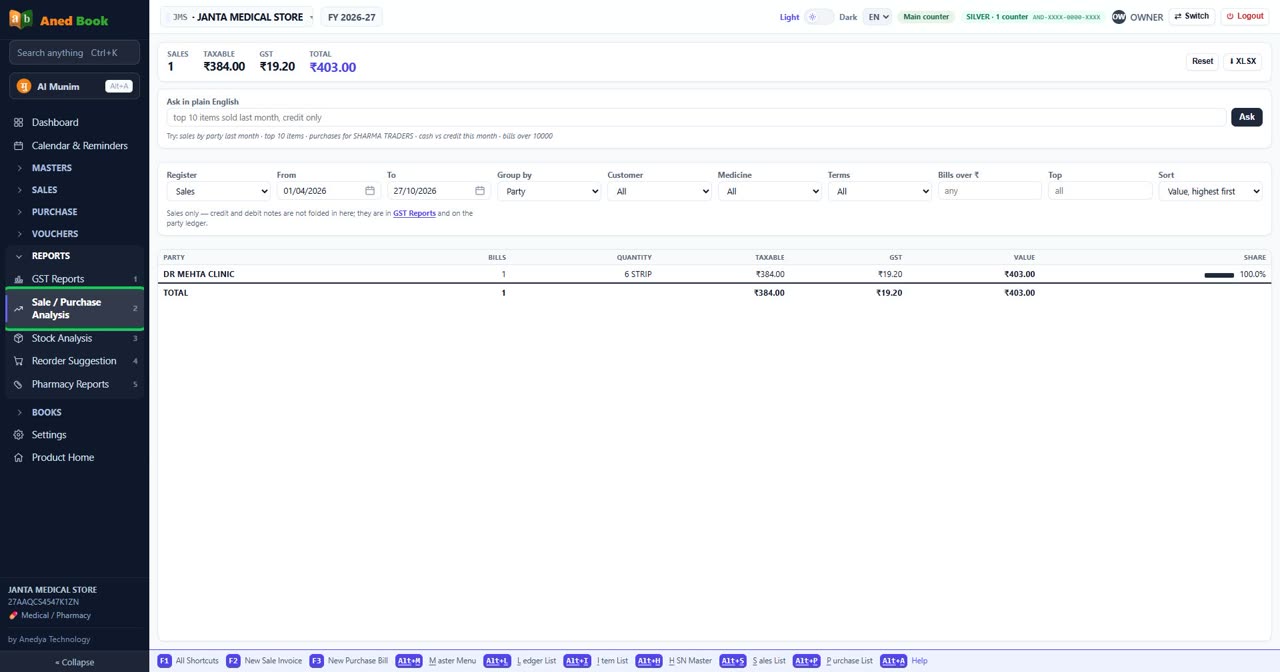
Step by step
Every option on this screen
Buttons
- Reset
- ⬇ XLSX
- Ask
Boxes to fill in
- Ask in plain English
- Register — choose from: Sales · Purchases
- From
- To
- Group by — choose from: Party · Month · Day · Cash / credit · Item · Company / manufacturer · HSN / SAC · Category · Batch / lot · MRP · No grouping — every bill
- Customer
- Medicine
- Terms — choose from: All · Cash · Credit
- Bills over ₹
- Top
- Sort — choose from: Value, highest first · Number of bills · Quantity · Name, A to Z
Columns in the list
- Party
- Bills
- Quantity
- Taxable
- GST
- Value
- Share
Still stuck? Press Alt + A inside the software and ask in your own words — it
works with no internet. Or talk to us on WhatsApp, phone or e-mail.