Aned Book Help
Help home Menu Step-by-step Video guides What's new Contact us Download Price YouTube
Start
  • Dashboard
  • Calendar & Reminders
Masters
  • Customers & Suppliers
  • Ledgers
  • M.R.s
  • Items
  • Barcode Labels
  • HSN / SAC Codes
  • Batch ledger
  • Physical Stock
  • Stock Journals
  • Stock Transfers
  • Stock by Godown
  • Shifts
  • Duplicate Check
  • Opening Balances
Sales
  • Sales Invoices
  • Sale Challans
  • E-way Bills
  • Quotations
  • Sale Orders
  • Credit Notes
Purchase
  • Purchase Bills
  • Purchase Challans
  • Purchase Orders
  • Debit Notes
Vouchers
  • Receipt Vouchers
  • Payment Vouchers
  • Contra Vouchers
  • Journal Vouchers
  • Sale Vouchers
  • Purchase Vouchers
  • GST Outward
  • GST Inward
  • All Vouchers
  • Day Book Entry — cash and bank, many days
  • Bank Statement Entry
  • Credit Note (Amount)
  • Debit Note (Amount)
  • Outstanding Ageing
  • Interest on Overdue
  • Cheques (PDC)
  • Bank Reconciliation
Restaurant
  • Tables
Transport
  • Consignment Notes
  • Freight Register
Reports
  • GST Reports
  • Sale / Purchase Analysis
  • Stock Analysis
  • Reorder Suggestion
  • Commission
  • Pharmacy Reports
Books
  • Accounts
  • Profitability
  • Imports & Exports
Settings
  • Company profile
  • Trade profile
  • Metal rates
  • Fuel rates
  • Cost centres
  • Nozzles
  • Bill of materials
  • Barcode labels
  • Financial year
  • All companies
  • Users
  • HSN / SAC codes
  • GSTIN verification
  • Backup / Export
  • Printer setup
  • Extra counters
  • Registration
  • About
Aned Book help › Menu › Purchase › Purchase Bills

It says “Batch details missing”

If this happens

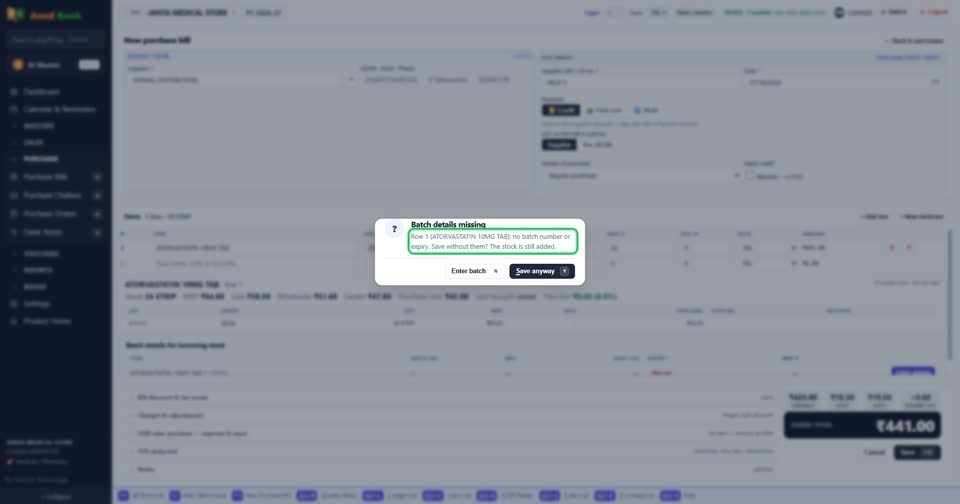
A medicine on the bill has no batch number or expiry. Press Enter batch to type them — that is best, so expiry alerts stay right. Or press Save anyway: the stock is still added, in a batch named after the date with no expiry, which sells last.

  1. The question names the row and the item, and gives both ways.

    Close-up: The question names the row and the item, and gives both ways. The question names the row and the item, and gives both ways.
More questions on Purchase Bills

  • How do I enter a supplier’s bill?
  • Where do I type the batch number and expiry?
  • I paid the supplier when the goods came. How do I enter that?
  • The supplier gave free goods on a scheme. How do I enter them?
  • How do I add freight or transport charges on the bill?
  • Can the software read the supplier’s bill for me?
  • It says “Select a supplier”
  • It says “You already entered bill … from this supplier”
  • It says “you cannot receive expired stock”
  • It says “MRP is below your purchase rate”
  • Why doesn’t the purchase bill number come by itself?
  • Why can I save a medicine without a batch?
Still stuck? Press Alt + A inside the software and ask in your own words — it works with no internet. Or talk to us on WhatsApp, phone or e-mail.
Aned Book — GST billing and inventory software for Indian shops. ANEDYA TECHNOLOGY LLP · anedya.net · Contact us