Where do I type the batch number and expiry?
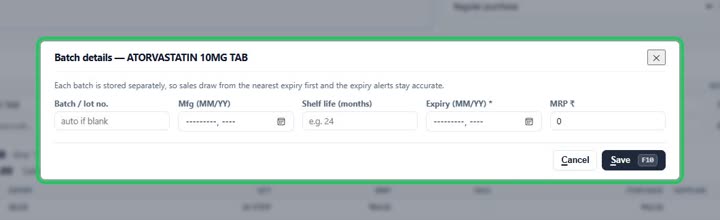
How toWhen a medicine that keeps batches is on the bill, a box “Batch details for incoming stock” appears under the items. Press Enter details on its row and type the batch, expiry (MM/YY) and MRP. Each batch is kept separately, so sales take the nearest expiry first.
Under the items: press Enter details on the medicine’s row.

Type the batch, the expiry and the MRP, and press Save.

More questions on Purchase Bills
- How do I enter a supplier’s bill?
- I paid the supplier when the goods came. How do I enter that?
- The supplier gave free goods on a scheme. How do I enter them?
- How do I add freight or transport charges on the bill?
- Can the software read the supplier’s bill for me?
- It says “Select a supplier”
- It says “You already entered bill … from this supplier”
- It says “Batch details missing”
- It says “you cannot receive expired stock”
- It says “MRP is below your purchase rate”
- Why doesn’t the purchase bill number come by itself?
- Why can I save a medicine without a batch?
Still stuck? Press Alt + A inside the software and ask in your own words — it
works with no internet. Or talk to us on WhatsApp, phone or e-mail.