Aned BookHelp
अAI MunimAlt+A
▦Dashboard ▤Calendar & Reminders
MastersCustomers & SuppliersLedgersM.R.sItemsBarcode LabelsHSN / SAC CodesBatch ledgerPhysical StockStock JournalsStock TransfersStock by GodownShiftsDuplicate CheckOpening Balances
SalesSales InvoicesSale ChallansE-way BillsQuotationsSale OrdersCredit Notes
PurchasePurchase BillsPurchase ChallansPurchase OrdersDebit Notes
VouchersReceipt VouchersPayment VouchersContra VouchersJournal VouchersSale VouchersPurchase VouchersGST OutwardGST InwardAll VouchersDay Book Entry — cash and bank, many daysBank Statement EntryCredit Note (Amount)Debit Note (Amount)Outstanding AgeingInterest on OverdueCheques (PDC)Bank Reconciliation
RestaurantTables
TransportConsignment NotesFreight Register
ReportsGST ReportsSale / Purchase AnalysisStock AnalysisReorder SuggestionCommissionPharmacy Reports
BooksAccountsProfitabilityImports & Exports
⚙Settings ⌂Product Home
MessagesFeaturesPhone app Step-by-stepVideosWhat's newContact us
DownloadPriceYouTubeContact us
Aned Book help › Menu › Purchase › Purchase Bills

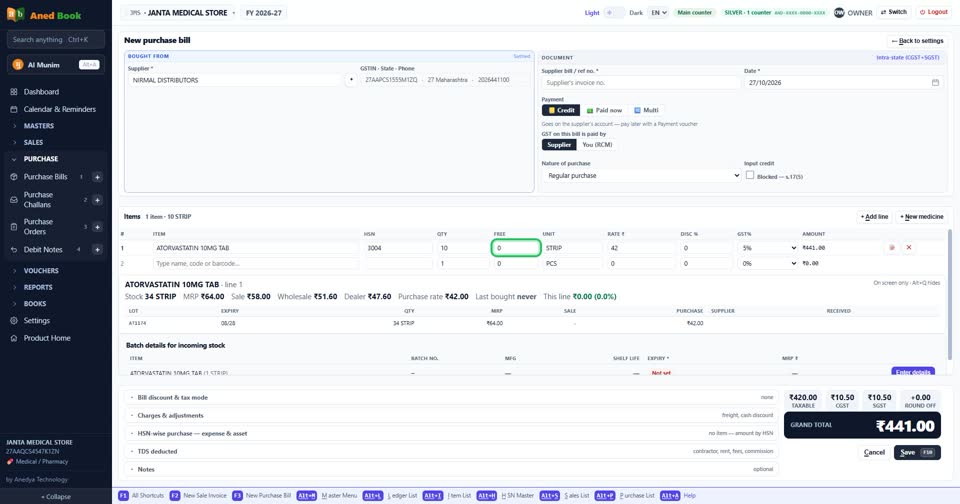
The supplier gave free goods on a scheme. How do I enter them?

How to

Type the free quantity in the FREE box on the line. The free goods go into stock; you pay only for the quantity in QTY.

  1. The FREE box beside the quantity.

    The FREE box beside the quantity.

More questions on Purchase Bills

  • How do I enter a supplier’s bill?
  • Where do I type the batch number and expiry?
  • I paid the supplier when the goods came. How do I enter that?
  • How do I add freight or transport charges on the bill?
  • Can the software read the supplier’s bill for me?
  • It says “Select a supplier”
  • It says “You already entered bill … from this supplier”
  • It says “Batch details missing”
  • It says “you cannot receive expired stock”
  • It says “MRP is below your purchase rate”
  • Why doesn’t the purchase bill number come by itself?
  • Why can I save a medicine without a batch?
Still stuck? Press Alt + A inside the software and ask in your own words — it works with no internet. Or talk to us on WhatsApp, phone or e-mail.
Aned Book — GST billing and inventory software for Indian shops. ANEDYA TECHNOLOGY LLP · anedya.net · Contact us