Aned Book Help
Help home Menu Step-by-step Video guides What's new Contact us Download Price YouTube
Start
  • Dashboard
  • Calendar & Reminders
Masters
  • Customers & Suppliers
  • Ledgers
  • M.R.s
  • Items
  • Barcode Labels
  • HSN / SAC Codes
  • Batch ledger
  • Physical Stock
  • Stock Journals
  • Stock Transfers
  • Stock by Godown
  • Shifts
  • Duplicate Check
  • Opening Balances
Sales
  • Sales Invoices
  • Sale Challans
  • E-way Bills
  • Quotations
  • Sale Orders
  • Credit Notes
Purchase
  • Purchase Bills
  • Purchase Challans
  • Purchase Orders
  • Debit Notes
Vouchers
  • Receipt Vouchers
  • Payment Vouchers
  • Contra Vouchers
  • Journal Vouchers
  • Sale Vouchers
  • Purchase Vouchers
  • GST Outward
  • GST Inward
  • All Vouchers
  • Day Book Entry — cash and bank, many days
  • Bank Statement Entry
  • Credit Note (Amount)
  • Debit Note (Amount)
  • Outstanding Ageing
  • Interest on Overdue
  • Cheques (PDC)
  • Bank Reconciliation
Restaurant
  • Tables
Transport
  • Consignment Notes
  • Freight Register
Reports
  • GST Reports
  • Sale / Purchase Analysis
  • Stock Analysis
  • Reorder Suggestion
  • Commission
  • Pharmacy Reports
Books
  • Accounts
  • Profitability
  • Imports & Exports
Settings
  • Company profile
  • Trade profile
  • Metal rates
  • Fuel rates
  • Cost centres
  • Nozzles
  • Bill of materials
  • Barcode labels
  • Financial year
  • All companies
  • Users
  • HSN / SAC codes
  • GSTIN verification
  • Backup / Export
  • Printer setup
  • Extra counters
  • Registration
  • About
Aned Book help › Menu › Masters › Customers & Suppliers

A customer already owed me money before I started. Where do I enter that?

How to

Edit the customer and type the old amount as the opening balance. Choose Debit (DR) when they owe you and Credit (CR) when you owe them. It is added to their balance from the first day of your books.

  1. Opening balance, with Debit or Credit beside it.
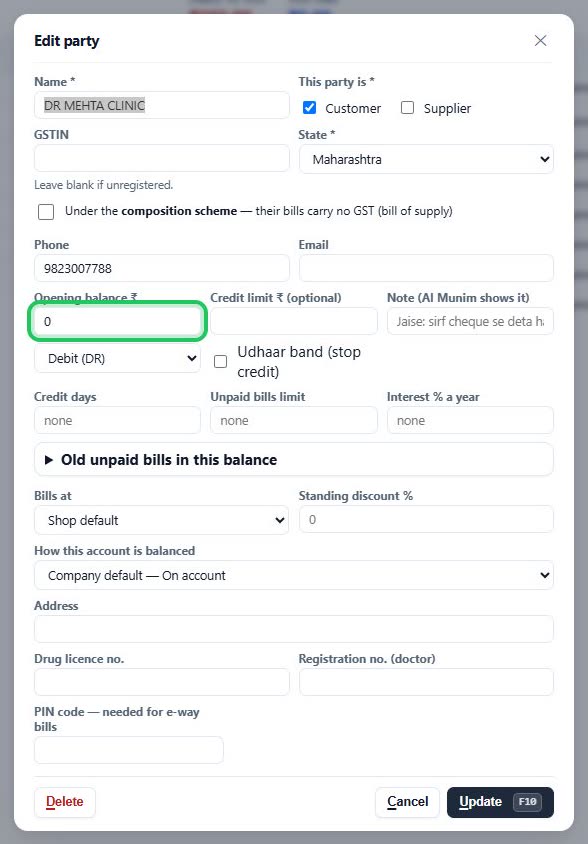
    Close-up: Opening balance, with Debit or Credit beside it. Opening balance, with Debit or Credit beside it.

More questions on Customers & Suppliers

  • How do I add a new customer or supplier?
  • How do I stop a customer taking too much udhaar?
  • How do I see or print what a customer owes?
  • How do I send a payment reminder on WhatsApp?
  • It says “Invalid GST number”
  • It says “This GST number is already used by …”
  • It says “… is already a party”
  • It says “Tick Customer, Supplier, or both”
  • Why doesn’t a party come up when I make a bill?
Still stuck? Press Alt + A inside the software and ask in your own words — it works with no internet. Or talk to us on WhatsApp, phone or e-mail.
Aned Book — GST billing and inventory software for Indian shops. ANEDYA TECHNOLOGY LLP · anedya.net · Contact us