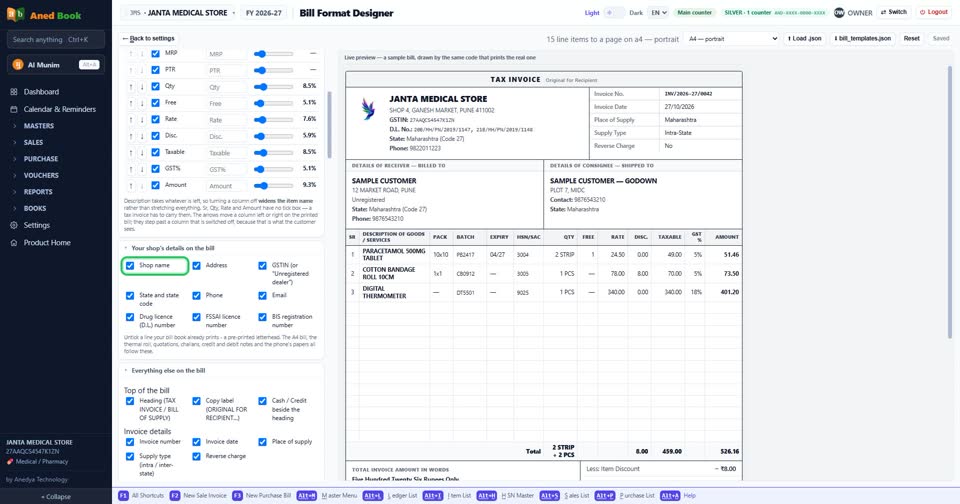
How do I show or remove “Shop name” on the bill?
How toSettings › Company profile › Bill format designer › Open the designer: tick “Shop name” to print it on the bill, untick it to leave it off, then press Save format. Tick to print your shop’s name on the bill; untick to leave it off.
In the bill designer: “Shop name”. Tick to print it, untick to leave it off, then Save format.
More questions on Company profile
- How do I change “State”?
- How do I change “Round the total to”?
- How do I change “Rounding direction”?
- How do I change “Invoice paper”?
- How do I change “What a new quotation is headed”?
- How do I change “Captions on the bill, challan and quotation”?
- How do I change “The amount-in-words line”?
- How do I change “What the rates you type already include”?
- How do I change “Default billing rate”?
- How do I change “Sale challan”?
- How do I change “Quotation / estimate”?
- How do I change “Sale order”?
- How do I change “Where a sale rate comes from”?
- How do I change “Batch on a sale”?
- How do I change “How the printer takes the leaf”?
- How do I change “Link to the bill as a PDF”?
- How do I change “When you press WhatsApp on a bill”?
- How do I change “Tell account customers what they owe”?
- How do I change “Prescriber and patient at the counter”?
- How do I change “A picture of the prescription on the bill”?
- How do I change “GST on your freight — which option have you filed for?”?
- How do I turn “composition scheme” on or off?
- How do I turn “QRMP scheme” on or off?
- How do I turn “On a concessional rate with no input tax credit” on or off?
- How do I turn “bill by bill” on or off?
- How do I turn “Original for Recipient” on or off?
- How do I turn “Duplicate for Transporter” on or off?
- How do I turn “Triplicate for Supplier” on or off?
- How do I turn “Print "Software by ANEDYA TECHNOLOGY LLP" at the foot” on or off?
- How do I turn “Apply section 194Q / 206C(1H)” on or off?
- How do I turn “Rate per line” on or off?
- How do I turn “Taxable value, and the total” on or off?
- How do I turn “Show the GST% column” on or off?
- How do I turn “Signature block on the challan” on or off?
- How do I turn “Signature block on the quotation” on or off?
- How do I turn “Signature block on the credit and debit note” on or off?
- How do I turn “Show the GST% column on the note” on or off?
- How do I turn “This business is required to issue e-invoices” on or off?
- How do I turn “Print MRP and PTR on sale bills” on or off?
- How do I turn “Bill discount also reduces freight and other bill charges” on or off?
- How do I turn “Allow sale of zero / negative stock items” on or off?
- How do I turn “This computer has a screen facing the customer” on or off?
- How do I turn “Open the drawer after a bill that takes cash” on or off?
- How do I turn “The drawer is wired to pin 5” on or off?
- How do I turn “Cross every cheque "A/C PAYEE"” on or off?
- How do I turn “Customers earn points on every bill” on or off?
- How do I turn “Only me” on or off?
- How do I change “Line style” on the bill?
- How do I change “Typeface” on the bill?
- How do I change “Long item names & addresses” on the bill?
- How do I show or remove “Description of Goods / Services” on the bill?
- How do I show or remove “Part No.” on the bill?
- How do I show or remove “Pack” on the bill?
- How do I show or remove “Batch” on the bill?
- How do I show or remove “Expiry” on the bill?
- How do I show or remove “HSN/SAC” on the bill?
- How do I show or remove “MRP” on the bill?
- How do I show or remove “PTR” on the bill?
- How do I show or remove “Qty” on the bill?
- How do I show or remove “Free” on the bill?
- How do I show or remove “Rate” on the bill?
- How do I show or remove “Disc.” on the bill?
- How do I show or remove “Taxable” on the bill?
- How do I show or remove “GST%” on the bill?
- How do I show or remove “Amount” on the bill?
- How do I show or remove “Address” on the bill?
- How do I show or remove “GSTIN (or "Unregistered dealer")” on the bill?
- How do I show or remove “State and state code” on the bill?
- How do I show or remove “Phone” on the bill?
- How do I show or remove “Email” on the bill?
- How do I show or remove “Drug licence (D.L.) number” on the bill?
- How do I show or remove “FSSAI licence number” on the bill?
- How do I show or remove “BIS registration number” on the bill?
- How do I show or remove “Heading (TAX INVOICE / BILL OF SUPPLY)” on the bill?
- How do I show or remove “Copy label (ORIGINAL FOR RECIPIENT…)” on the bill?
- How do I show or remove “Cash / Credit beside the heading” on the bill?
- How do I show or remove “Invoice number” on the bill?
- How do I show or remove “Invoice date” on the bill?
- How do I show or remove “Place of supply” on the bill?
- How do I show or remove “Supply type (intra / inter-state)” on the bill?
- How do I show or remove “Reverse charge” on the bill?
- How do I show or remove “The billed-to box” on the bill?
- How do I show or remove “Buyer's address” on the bill?
- How do I show or remove “Buyer's GSTIN” on the bill?
- How do I show or remove “Buyer's state” on the bill?
- How do I show or remove “Buyer's phone” on the bill?
- How do I show or remove “Total row under the items” on the bill?
- How do I show or remove “Discount rows” on the bill?
- How do I show or remove “Taxable value / sub-total” on the bill?
- How do I show or remove “CGST” on the bill?
- How do I show or remove “SGST” on the bill?
- How do I show or remove “IGST” on the bill?
- How do I show or remove “Cess” on the bill?
- How do I show or remove “Total tax” on the bill?
- How do I show or remove “Round off” on the bill?
- How do I show or remove “Grand total” on the bill?
- How do I show or remove “MRP total and "You saved"” on the bill?
- How do I show or remove “Prepared by” on the bill?
- How do I show or remove “Computer-generated invoice” on the bill?
- How do I show or remove “Subject to … jurisdiction” on the bill?
- How do I show or remove “Logo” on the bill?
- How do I show or remove “Line numbers (1. 2. 3.)” on the bill?
- How do I show or remove “GST % on each item line” on the bill?
- How do I show or remove “Discount on each item line” on the bill?
- How do I show or remove “MRP / PTR line under the item” on the bill?
- How do I show or remove “Tax summary” on the bill?
- How do I show or remove “Amount in words” on the bill?
- How do I show or remove “Bank and UPI details” on the bill?
- How do I show or remove “Declaration” on the bill?
- How do I show or remove “Terms” on the bill?
- How do I show or remove “Billed by” on the bill?
- How do I show or remove “Loyalty points” on the bill?
- How do I show or remove “Items in columns (Item | MRP | Qty | Rate | Amount)” on the bill?
- How do I show or remove “Dotted line between items” on the bill?
- How do I show or remove “Shop logo” on the bill?
- How do I show or remove “Shipped-to box” on the bill?
- How do I show or remove “Rate-wise tax panel” on the bill?
- How do I show or remove “Bank details & payment QR” on the bill?
- How do I show or remove “Terms & conditions” on the bill?
- How do I show or remove “Notes line” on the bill?
- How do I show or remove “Signature block” on the bill?
- How do I show or remove “Outstanding balance” on the bill?
- How do I show or remove “Item remarks (under the item name)” on the bill?
Still stuck? Press Alt + A inside the software and ask in your own words — it
works with no internet. Or talk to us on WhatsApp, phone or e-mail.