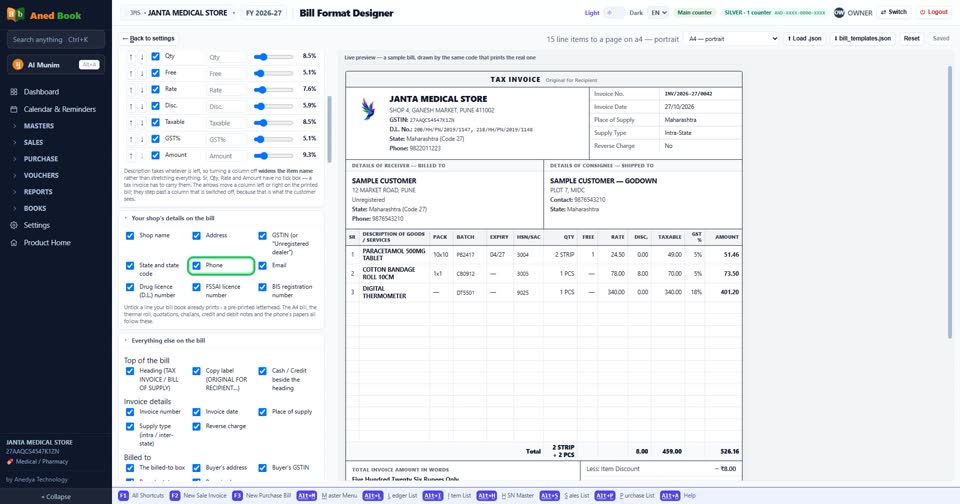
How do I show or remove “Phone” on the bill?
How toSettings › Company profile › Bill format designer › Open the designer: tick “Phone” to print it on the bill, untick it to leave it off, then press Save format. The phone number. WhatsApp messages go to this number.
In the bill designer: “Phone”. Tick to print it, untick to leave it off, then Save format.
More questions on Company profile
- How do I change “State”?
- How do I change “Round the total to”?
- How do I change “Rounding direction”?
- How do I change “Invoice paper”?
- How do I change “What a new quotation is headed”?
- How do I change “Captions on the bill, challan and quotation”?
- How do I change “The amount-in-words line”?
- How do I change “What the rates you type already include”?
- How do I change “Default billing rate”?
- How do I change “Sale challan”?
- How do I change “Quotation / estimate”?
- How do I change “Sale order”?
- How do I change “Where a sale rate comes from”?
- How do I change “Batch on a sale”?
- How do I change “How the printer takes the leaf”?
- How do I change “Link to the bill as a PDF”?
- How do I change “When you press WhatsApp on a bill”?
- How do I change “Tell account customers what they owe”?
- How do I change “Prescriber and patient at the counter”?
- How do I change “A picture of the prescription on the bill”?
- How do I change “GST on your freight — which option have you filed for?”?
- How do I turn “composition scheme” on or off?
- How do I turn “QRMP scheme” on or off?
- How do I turn “On a concessional rate with no input tax credit” on or off?
- How do I turn “bill by bill” on or off?
- How do I turn “Original for Recipient” on or off?
- How do I turn “Duplicate for Transporter” on or off?
- How do I turn “Triplicate for Supplier” on or off?
- How do I turn “Print "Software by ANEDYA TECHNOLOGY LLP" at the foot” on or off?
- How do I turn “Apply section 194Q / 206C(1H)” on or off?
- How do I turn “Rate per line” on or off?
- How do I turn “Taxable value, and the total” on or off?
- How do I turn “Show the GST% column” on or off?
- How do I turn “Signature block on the challan” on or off?
- How do I turn “Signature block on the quotation” on or off?
- How do I turn “Signature block on the credit and debit note” on or off?
- How do I turn “Show the GST% column on the note” on or off?
- How do I turn “This business is required to issue e-invoices” on or off?
- How do I turn “Print MRP and PTR on sale bills” on or off?
- How do I turn “Bill discount also reduces freight and other bill charges” on or off?
- How do I turn “Allow sale of zero / negative stock items” on or off?
- How do I turn “This computer has a screen facing the customer” on or off?
- How do I turn “Open the drawer after a bill that takes cash” on or off?
- How do I turn “The drawer is wired to pin 5” on or off?
- How do I turn “Cross every cheque "A/C PAYEE"” on or off?
- How do I turn “Customers earn points on every bill” on or off?
- How do I turn “Only me” on or off?
- How do I change “Line style” on the bill?
- How do I change “Typeface” on the bill?
- How do I change “Long item names & addresses” on the bill?
- How do I show or remove “Description of Goods / Services” on the bill?
- How do I show or remove “Part No.” on the bill?
- How do I show or remove “Pack” on the bill?
- How do I show or remove “Batch” on the bill?
- How do I show or remove “Expiry” on the bill?
- How do I show or remove “HSN/SAC” on the bill?
- How do I show or remove “MRP” on the bill?
- How do I show or remove “PTR” on the bill?
- How do I show or remove “Qty” on the bill?
- How do I show or remove “Free” on the bill?
- How do I show or remove “Rate” on the bill?
- How do I show or remove “Disc.” on the bill?
- How do I show or remove “Taxable” on the bill?
- How do I show or remove “GST%” on the bill?
- How do I show or remove “Amount” on the bill?
- How do I show or remove “Shop name” on the bill?
- How do I show or remove “Address” on the bill?
- How do I show or remove “GSTIN (or "Unregistered dealer")” on the bill?
- How do I show or remove “State and state code” on the bill?
- How do I show or remove “Email” on the bill?
- How do I show or remove “Drug licence (D.L.) number” on the bill?
- How do I show or remove “FSSAI licence number” on the bill?
- How do I show or remove “BIS registration number” on the bill?
- How do I show or remove “Heading (TAX INVOICE / BILL OF SUPPLY)” on the bill?
- How do I show or remove “Copy label (ORIGINAL FOR RECIPIENT…)” on the bill?
- How do I show or remove “Cash / Credit beside the heading” on the bill?
- How do I show or remove “Invoice number” on the bill?
- How do I show or remove “Invoice date” on the bill?
- How do I show or remove “Place of supply” on the bill?
- How do I show or remove “Supply type (intra / inter-state)” on the bill?
- How do I show or remove “Reverse charge” on the bill?
- How do I show or remove “The billed-to box” on the bill?
- How do I show or remove “Buyer's address” on the bill?
- How do I show or remove “Buyer's GSTIN” on the bill?
- How do I show or remove “Buyer's state” on the bill?
- How do I show or remove “Buyer's phone” on the bill?
- How do I show or remove “Total row under the items” on the bill?
- How do I show or remove “Discount rows” on the bill?
- How do I show or remove “Taxable value / sub-total” on the bill?
- How do I show or remove “CGST” on the bill?
- How do I show or remove “SGST” on the bill?
- How do I show or remove “IGST” on the bill?
- How do I show or remove “Cess” on the bill?
- How do I show or remove “Total tax” on the bill?
- How do I show or remove “Round off” on the bill?
- How do I show or remove “Grand total” on the bill?
- How do I show or remove “MRP total and "You saved"” on the bill?
- How do I show or remove “Prepared by” on the bill?
- How do I show or remove “Computer-generated invoice” on the bill?
- How do I show or remove “Subject to … jurisdiction” on the bill?
- How do I show or remove “Logo” on the bill?
- How do I show or remove “Line numbers (1. 2. 3.)” on the bill?
- How do I show or remove “GST % on each item line” on the bill?
- How do I show or remove “Discount on each item line” on the bill?
- How do I show or remove “MRP / PTR line under the item” on the bill?
- How do I show or remove “Tax summary” on the bill?
- How do I show or remove “Amount in words” on the bill?
- How do I show or remove “Bank and UPI details” on the bill?
- How do I show or remove “Declaration” on the bill?
- How do I show or remove “Terms” on the bill?
- How do I show or remove “Billed by” on the bill?
- How do I show or remove “Loyalty points” on the bill?
- How do I show or remove “Items in columns (Item | MRP | Qty | Rate | Amount)” on the bill?
- How do I show or remove “Dotted line between items” on the bill?
- How do I show or remove “Shop logo” on the bill?
- How do I show or remove “Shipped-to box” on the bill?
- How do I show or remove “Rate-wise tax panel” on the bill?
- How do I show or remove “Bank details & payment QR” on the bill?
- How do I show or remove “Terms & conditions” on the bill?
- How do I show or remove “Notes line” on the bill?
- How do I show or remove “Signature block” on the bill?
- How do I show or remove “Outstanding balance” on the bill?
- How do I show or remove “Item remarks (under the item name)” on the bill?
Still stuck? Press Alt + A inside the software and ask in your own words — it
works with no internet. Or talk to us on WhatsApp, phone or e-mail.