Aned BookHelp
अAI MunimAlt+A
▦Dashboard ▤Calendar & Reminders
MastersCustomers & SuppliersLedgersM.R.sItemsBarcode LabelsHSN / SAC CodesBatch ledgerPhysical StockStock JournalsStock TransfersStock by GodownShiftsDuplicate CheckOpening Balances
SalesSales InvoicesSale ChallansE-way BillsQuotationsSale OrdersCredit Notes
PurchasePurchase BillsPurchase ChallansPurchase OrdersDebit Notes
VouchersReceipt VouchersPayment VouchersContra VouchersJournal VouchersSale VouchersPurchase VouchersGST OutwardGST InwardAll VouchersDay Book Entry — cash and bank, many daysBank Statement EntryCredit Note (Amount)Debit Note (Amount)Outstanding AgeingInterest on OverdueCheques (PDC)Bank Reconciliation
RestaurantTables
TransportConsignment NotesFreight Register
ReportsGST ReportsSale / Purchase AnalysisStock AnalysisReorder SuggestionCommissionPharmacy Reports
BooksAccountsProfitabilityImports & Exports
⚙Settings ⌂Product Home
MessagesFeaturesPhone app Step-by-stepVideosWhat's newContact us
DownloadPriceYouTubeContact us
Aned Book help › Menu › Settings › Users

How do I turn “ANEDYA” on or off?

How to

Settings › Users: tick “ANEDYA” to turn it on, untick it to turn it off. The change is kept as soon as you make it. talk me back in over the phone — if you lose both of the above, we can give you a code that resets this PIN. It never signs anyone in, and any use of it is shown on your dashboard. Turn it off once you are confident of your own two ways back; then nobody but you can reset it, including us.

  1. Settings › Users: “ANEDYA”. Tick for on, untick for off.
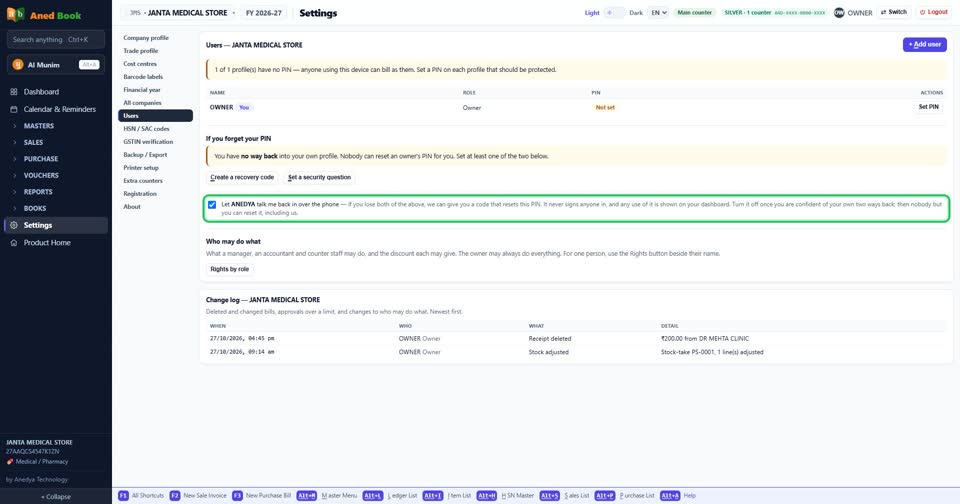
    Settings › Users: “ANEDYA”. Tick for on, untick for off.
Still stuck? Press Alt + A inside the software and ask in your own words — it works with no internet. Or talk to us on WhatsApp, phone or e-mail.
Aned Book — GST billing and inventory software for Indian shops. ANEDYA TECHNOLOGY LLP · anedya.net · Contact us