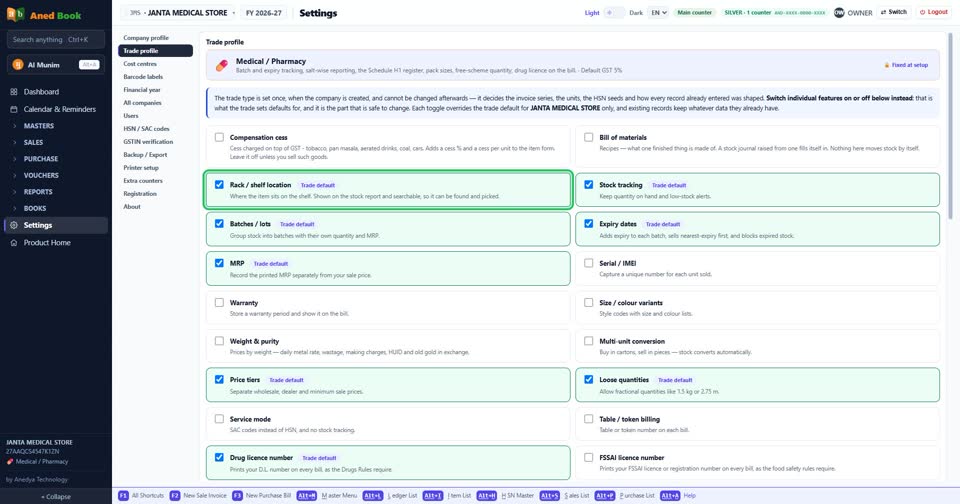
How do I turn “Rack / shelf location” on or off?
How toSettings › Trade profile: tick “Rack / shelf location” to turn it on, untick it to turn it off. The change is kept as soon as you make it. Trade default Where the item sits on the shelf. Shown on the stock report and searchable, so it can be found and picked.
Settings › Trade profile: “Rack / shelf location”. Tick for on, untick for off.
More questions on Trade profile
- How do I turn “Compensation cess” on or off?
- How do I turn “Bill of materials” on or off?
- How do I turn “Stock tracking” on or off?
- How do I turn “Batches / lots” on or off?
- How do I turn “Expiry dates” on or off?
- How do I turn “MRP” on or off?
- How do I turn “Serial / IMEI” on or off?
- How do I turn “Warranty” on or off?
- How do I turn “Size / colour variants” on or off?
- How do I turn “Weight & purity” on or off?
- How do I turn “Multi-unit conversion” on or off?
- How do I turn “Price tiers” on or off?
- How do I turn “Loose quantities” on or off?
- How do I turn “Service mode” on or off?
- How do I turn “Table / token billing” on or off?
- How do I turn “Drug licence number” on or off?
- How do I turn “FSSAI licence number” on or off?
- How do I turn “Pack size” on or off?
- How do I turn “Free / scheme quantity” on or off?
- How do I turn “Schemes” on or off?
- How do I turn “Part numbers & OEM” on or off?
- How do I turn “Salt / molecule” on or off?
- How do I turn “Drug schedule” on or off?
- How do I turn “E-way bills” on or off?
- How do I turn “Reverse charge (outward)” on or off?
- How do I turn “Exports and SEZ supplies” on or off?
- How do I turn “Consignment notes (LR / bilty)” on or off?
- How do I turn “Salesman / M.R.” on or off?
- How do I turn “Daily fuel rates” on or off?
- How do I turn “Optical store” on or off?
- How do I turn “Two discount columns on each line” on or off?
Still stuck? Press Alt + A inside the software and ask in your own words — it
works with no internet. Or talk to us on WhatsApp, phone or e-mail.