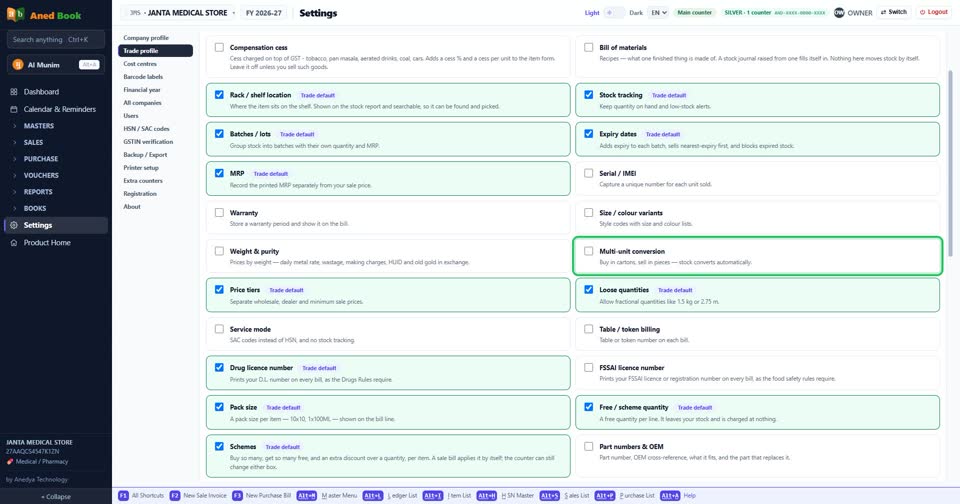
How do I turn “Multi-unit conversion” on or off?
How toSettings › Trade profile: tick “Multi-unit conversion” to turn it on, untick it to turn it off. The change is kept as soon as you make it. Buy in cartons, sell in pieces — stock converts automatically.
Settings › Trade profile: “Multi-unit conversion”. Tick for on, untick for off.
More questions on Trade profile
- How do I turn “Compensation cess” on or off?
- How do I turn “Bill of materials” on or off?
- How do I turn “Rack / shelf location” on or off?
- How do I turn “Stock tracking” on or off?
- How do I turn “Batches / lots” on or off?
- How do I turn “Expiry dates” on or off?
- How do I turn “MRP” on or off?
- How do I turn “Serial / IMEI” on or off?
- How do I turn “Warranty” on or off?
- How do I turn “Size / colour variants” on or off?
- How do I turn “Weight & purity” on or off?
- How do I turn “Price tiers” on or off?
- How do I turn “Loose quantities” on or off?
- How do I turn “Service mode” on or off?
- How do I turn “Table / token billing” on or off?
- How do I turn “Drug licence number” on or off?
- How do I turn “FSSAI licence number” on or off?
- How do I turn “Pack size” on or off?
- How do I turn “Free / scheme quantity” on or off?
- How do I turn “Schemes” on or off?
- How do I turn “Part numbers & OEM” on or off?
- How do I turn “Salt / molecule” on or off?
- How do I turn “Drug schedule” on or off?
- How do I turn “E-way bills” on or off?
- How do I turn “Reverse charge (outward)” on or off?
- How do I turn “Exports and SEZ supplies” on or off?
- How do I turn “Consignment notes (LR / bilty)” on or off?
- How do I turn “Salesman / M.R.” on or off?
- How do I turn “Daily fuel rates” on or off?
- How do I turn “Optical store” on or off?
- How do I turn “Two discount columns on each line” on or off?
Still stuck? Press Alt + A inside the software and ask in your own words — it
works with no internet. Or talk to us on WhatsApp, phone or e-mail.